In this lecture, you will learn step by step how to create modules in Python and use them via import. Starting from the "single-file Fortune Cookie" created in the previous chapter, you will experience the following:
- Separating messages for each language into different files
- Loading modules from
fortune.py - Understanding how modularization improves code readability
Table of Contents(目次)
Preparing Modules and Packages
In Python, a folder that groups related modules is called a package. When creating a package, prepare an empty __init__.py file.
Role of __init__.py:
- Required to let Python recognize the folder as a package
- It can be empty. Later, you can also write common initialization code for the entire package
- Without it, Python treats the folder as a regular directory and
importwill not work
Directory structure example:
fortune_cookie/
├─ fortune.py
└─ message/
   ├─ __init__.py
   ├─ language_en.py
   └─ language_jp.py
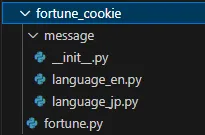
Key points:
- fortune_cookie/… project root
- fortune.py… execution file
- message/… package containing message-related modules
- __init__.py… file to make Python recognize the package
- language_en.py… module containing English messages
- language_jp.py… module containing Japanese messages
Creating Modules for Each Language
English Module
# message/language_en.py

# MESSAGES is a dict containing text used in the app
MESSAGES = {
    'app_title': 'Fortune Cookie',  # string used for app title display
    'prompt_open': 'Would you like to open a cookie? (y/n): ',  # prompt to ask user action
    'fortune_prefix': 'Your fortune for today is:',  # prefix for fortune display
    'goodbye': 'See you tomorrow with more luck!'  # farewell message
}

# FORTUNES is a list of fortunes displayed randomly
FORTUNES = [
    'Great Fortune! A wonderful day awaits you.',
    'Fair Fortune. Keep steady progress.',
    'Little Fortune. Stay patient and try again.',
    'Bad Fortune... but tomorrow is another chance.'
]
Key points:
- By keeping only English-related data here, it becomes easier to modify or add content later. Think of
fortune.pyas logic-only, andlanguage_en.pyas data-only. - Consider this file as editable by translators. Do not include logic here. Separating data from code allows text updates without touching the programmer's code.
Japanese Module
Similar to the English module, create a file to manage Japanese messages.
# message/language_jp.py

# MESSAGES is a dict containing text used in the app
MESSAGES = {
    'app_title': 'フォーチュンクッキー',  # string used for app title display
    'prompt_open': 'クッキーを開きますか? (y/n): ',  # prompt to ask user action
    'fortune_prefix': 'あなたの今日の運勢は:',  # prefix for fortune display
    'goodbye': 'また明日も幸運を!',  # farewell message
}

# FORTUNES is a list of fortunes displayed randomly
FORTUNES = [
    '大吉!最高の一日になりそうです!',
    '中吉。ちょっとした幸運が訪れるでしょう。',
    '小吉。小さな努力が実を結びます。',
    '凶...でも心配しすぎないでください。'
]
Basics of import and Various Syntax
To load data from language_en.py and language_jp.py in fortune.py, use the import keyword. When there is a folder hierarchy, specify the path from the project root directory using dots .. In this case, the root is fortune_cookie/.
There are several ways to write import combined with other keywords. Let's first see the available ways.
Hierarchy:
Root directory (fortune_cookie/)
└─ message/ (package)
   ├─ language_en.py (module)
   └─ language_jp.py (module)
import module_name
Comment out main() at the end of fortune.py to prevent execution, and try running the following code:
import message.language_en
import message.language_jp

print(message.language_en.MESSAGES)
print(message.language_en.FORTUNES)
print(message.language_jp.MESSAGES)
print(message.language_jp.FORTUNES)
The above import statements load the entire module. The module name is the Python file name without the .py extension. To call variables or functions, write them as module_name.variable_name.
(Below is an example loading only language_en.)
import module_name as alias
import message.language_en as lang
print(lang.MESSAGES)
print(lang.FORTUNES)
This shortens long names and makes code easier to read. In this case, it declares "import message.language_en as lang". Then you can access variables using lang.MESSAGES and lang.FORTUNES.
Using the as syntax also allows subsequent code to use the same name regardless of which module is loaded based on conditions. For example, whether the language (lang_code) is 'en' or 'jp', the following code can reference data via lang.~.
lang_code = 'en'
if lang_code == 'en':
    import message.language_en as lang
elif lang_code == 'jp':
    import message.language_jp as lang

print(lang.MESSAGES)
print(lang.FORTUNES)
from module_name import [variable/function/class]
from message.language_en import MESSAGES
print(MESSAGES)
This allows you to call only the needed variables or functions directly, omitting long module names.
In this case, it declares "import the variable MESSAGES from message.language_en". Only MESSAGES is loaded, so you cannot access FORTUNES with this syntax. To import multiple variables or functions, separate them with commas as follows:
from message.language_en import MESSAGES, FORTUNES
print(MESSAGES)
print(FORTUNES)
from module_name import [variable/function/class] as alias
from message.language_en import MESSAGES as en_messages
print(en_messages)
This is used when names conflict or you want to be more explicit. In this case, it declares "import MESSAGES from message.language_en as en_messages".
When importing multiple variables or functions from a module with different aliases, you can write them across multiple lines like this:
from message.language_en import MESSAGES as en_messages
from message.language_en import FORTUNES as en_fortunes
print(en_messages)
print(en_fortunes)
Modifying fortune.py to Use Modules
By organizing data into modules, fortune.py becomes logic-only. Even if new language modules are added in the future, fortune.py hardly needs changes.
# fortune.py
import random


def main():
    # Choose language
    lang_code = input('Choose a language (jp/en): ')

    # Switch module to load based on language code
    if lang_code == 'en':
        import message.language_en as lang
    else:  # 'jp' or else
        import message.language_jp as lang

    # Open a cookie?
    print(f"=== {lang.MESSAGES['app_title']} ===")
    answer = input(lang.MESSAGES['prompt_open'])

    if answer == 'y':
        print(f"{lang.MESSAGES['fortune_prefix']} {random.choice(lang.FORTUNES)}")
    else:
        print(lang.MESSAGES['goodbye'])


main()
Separating language management into modules improves the readability of fortune.py. As a rule, imports should be placed at the top of the module. However, when different modules need to be loaded conditionally, they can be placed inside the if block as shown in lines 10–13. Conditional imports (lazy imports) only load the necessary modules, making them memory-efficient and easier to extend.
Modules are imported as lang, so regardless of whether lang_code is 'en' or 'jp', subsequent code can access data via lang.MESSAGES or lang.FORTUNES.
Summary: Benefits of Modularization
- Separate files improve code readability
- Storing data in separate modules makes maintenance easier
- Easy to update translations or add support for additional languages (e.g., French, German)
fortune.pycan focus on logic unrelated to language management- However, at this stage, if new languages are added, you will need to extend the
ifconditions infortune.py
- However, at this stage, if new languages are added, you will need to extend the