What is a Python Docstring? Differences from Comments and Tips for Maintainable Class Design
In this section, we will learn how to leave descriptions in classes and methods using Docstrings. Utilizing Docstrings allows you and others to quickly understand class specifications, improving maintainability. Additionally, we'll review the concepts learned so far and experience designing maintainable classes.
What is a Docstring? Usage and How to Check in Python
In Python, you can leave descriptions for classes, methods, and functions in your code. These are called Docstrings. Writing Docstrings enables you to quickly check class specifications using IDE autocompletion or the help() function, greatly improving maintainability.
For example, let's check the Docstring of list using help(list).
help(list)
Help on class list in module builtins:

class list(object)
 |  list(iterable=(), /)
 |
 |  Built-in mutable sequence.
 |
 |  If no argument is given, the constructor creates a new empty list.
 |  The argument must be an iterable if specified.
 |
 |  Methods defined here:
 |
 |  __add__(self, value, /)
 |      Return self+value.
.........
 |  append(self, object, /)
 |      Append object to the end of the list.
 |
 |  clear(self, /)
 |      Remove all items from list.
 |
 |  copy(self, /)
 |      Return a shallow copy of the list.
.........
You can check information for each method of the list.
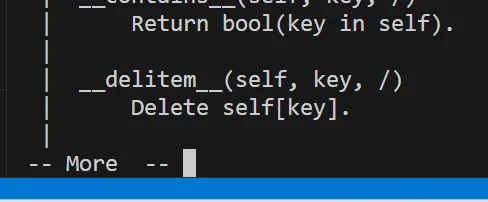
When displaying Docstrings, you may see -- More --. When this appears, focus on -- More -- and press Enter to display the next line.
# is a regular comment ignored at runtime, while a Docstring is retained as part of the class or function and displayed in help() or IDE tooltips. In other words, a Docstring is a "description saved for later use."
How to Write Docstrings: For Classes and Methods, and Checking in VSCode
Docstrings are placed immediately after the definition of a class or function (method), enclosed in triple quotes '''. In the description, you include an overview of the class or function, and information about instance variables or arguments. Aligning indentation and line breaks makes it more readable. IDEs (VSCode, PyCharm, etc.) display Docstrings during autocompletion, making them understandable to anyone.
class Car:
    '''Class representing a car.

    This class manages a car's brand, model, speed, and engine state.
    It provides basic operations such as starting/stopping the engine and getting/setting speed.

    Attributes:
        brand (str): Brand of the car.
        model (str): Model of the car.
        _speed (int): Current speed (not directly accessible externally).
        __engine_on (bool): Engine state (True=on / False=off, private attribute).
    '''

    def __init__(self, brand: str, model: str, speed: int = 0):
        '''Constructor. Sets the initial state of the car.

        Args:
            brand (str): Brand name.
            model (str): Model name.
            speed (int, optional): Initial speed (default is 0).
        '''
        self.brand = brand
        self.model = model
        self._speed = speed
        self.__engine_on = False
To check the class Docstring, use help(Car).
help(Car)
Example output:
class Car(builtins.object)
| Car(brand: str, model: str, speed: int = 0)
|
| Class representing a car.
|
| This class manages a car's brand, model, speed, and engine state.
| It provides basic operations such as starting/stopping the engine and getting/setting speed.
|
| Attributes:
| brand (str): Brand of the car.
| model (str): Model of the car.
| _speed (int): Current speed (not directly accessible externally).
| __engine_on (bool): Engine state (True=on / False=off, private attribute).
|
| Methods defined here:
|
| __init__(self, brand: str, model: str, speed: int = 0)
| Constructor. Sets the initial state of the car.
|
| Args:
| brand (str): Brand name.
| model (str): Model name.
| speed (int, optional): Initial speed (default is 0).
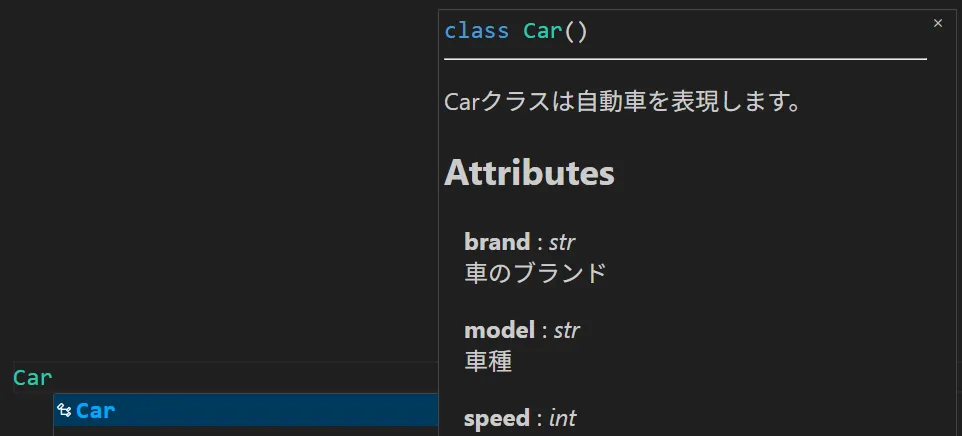
In Visual Studio Code, the Docstring content is displayed while entering a class or method.
What Makes a Good Class Design? Summary of Docstring Usage and Design in Python
Key points for good class design:
- Easy for others to understand
- Clear meaning for attributes and methods
- Internal structures are encapsulated and safe to use externally
- Common operations are made into methods to avoid code duplication
- Docstrings serve as a "table of contents" for the design
Practical Review
Let's summarize the class section and design a single class. Focus on the following points:
- Use
_and__to control access to attributes - Use
@propertyfor getters and setters - Use
__str__for readable object representation - Organize the role of classes, methods, and attributes using Docstrings
class Car:
    '''Class representing a car.

    This class manages a car's brand, model, speed, and engine state.
    It provides basic operations such as starting/stopping the engine and getting/setting speed.

    Attributes:
        brand (str): Brand of the car.
        model (str): Model of the car.
        _speed (int): Current speed (not directly accessible externally).
        __engine_on (bool): Engine state (True=on / False=off, private attribute).
    '''

    def __init__(self, brand: str, model: str, speed: int = 0):
        '''Constructor. Sets the initial state of the car.

        Args:
            brand (str): Brand name.
            model (str): Model name.
            speed (int, optional): Initial speed (default is 0).
        '''
        self.brand = brand
        self.model = model
        self._speed = speed
        self.__engine_on = False
def start_engine(self):
'''Starts the engine.
Changes the engine state to True (ON).
'''
self.__engine_on = True
def stop_engine(self):
'''Stops the engine.
Changes the engine state to False (OFF).
'''
self.__engine_on = False
@property
def speed(self) -> int:
'''Gets the current speed.
Returns:
int: Current speed (km/h).
'''
return self._speed
@speed.setter
def speed(self, value: int):
'''Sets the speed.
Raises an error if a value below 0 is provided.
Args:
value (int): Speed to set (km/h).
Raises:
ValueError: If the speed is less than 0.
'''
if value < 0:
raise ValueError('Speed must be 0 or higher.')
self._speed = value
def __str__(self) -> str:
'''Returns the string representation of the object.
Returns:
str: A string including the car's brand, model, speed, and engine state.
'''
return (
f'{self.brand} {self.model}'
f"(Speed: {self._speed}km/h, Engine: {'ON' if self.__engine_on else 'OFF'})"
)
Let's check the results of print() and help().
car = Car('Toyota', 'Corolla', 50)
print(car)
help(car)
Toyota Corolla(Speed: 50km/h, Engine: OFF)
Help on Car in module __main__ object:
class Car(builtins.object)
 |  Car(brand: str, model: str, speed: int = 0)
 |
 |  Class representing a car.
 |
 |  This class manages a car's brand, model, speed, and engine state.
 |  It provides basic operations such as starting/stopping the engine and getting/setting speed.
 |
 |  Attributes:
 |      brand (str): Brand of the car.
 |      model (str): Model of the car.
 |      _speed (int): Current speed (not directly accessible externally).
 |      __engine_on (bool): Engine state (True=on / False=off, private attribute).
 |
 |  Methods defined here:
 |
 |  __init__(self, brand: str, model: str, speed: int = 0)
 |      Constructor. Sets the initial state of the car.
 |
 |      Args:
 |          brand (str): Brand name.
 |          model (str): Model name.
 |          speed (int, optional): Initial speed (default is 0).
|
| __str__(self) -> str
| Returns the string representation of the object.
|
| Returns:
| str: A string including the car's brand, model, speed, and engine state.
|
| start_engine(self)
| Starts the engine.
|
| Changes the engine state to True (ON).
|
| stop_engine(self)
| Stops the engine.
|
| Changes the engine state to False (OFF).
|
| ----------------------------------------------------------------------
| Data descriptors defined here:
|
| __dict__
| dictionary for instance variables
|
| __weakref__
| list of weak references to the object
|
| speed
| Gets the current speed.
|
| Returns:
| int: Current speed (km/h).
In the code above, inside the format string returned by the __str__ method, there is 'ON' if self.__engine_on else 'OFF'. This is a commonly used Python syntax called the conditional operator (ternary expression). It may look complicated at first, but it is simply an "if statement written in one line."
Basic syntax:
value_if_true if condition else value_if_false
In plain English, it means:
"If condition is True, use value_if_true; otherwise, use value_if_false."
Example:
'ON' if self.__engine_on else 'OFF'
This can be read as:
"Return 'ON' if self.__engine_on is True; otherwise, return 'OFF'."
Equivalent using a normal if statement:
if self.__engine_on:
    status = 'ON'
else:
    status = 'OFF'
The concise one-line version is written as:
status = 'ON' if self.__engine_on else 'OFF'
Use cases:
- When you want to write a short conditional expression in one line
- When the value to assign to a variable depends only on a condition
Another example:
age = 20
message = 'Adult' if age >= 18 else 'Minor'
print(message)
Output:
Adult